Every n8n build, mapped.

These are the workflows running in our n8n instance today for ReDial Clinic, a doctor-led metabolic health clinic in Delhi: payments, ad tracking, AI chat, CRM sync and clinic operations. Each map is the real canvas, redrawn without credentials, URLs or customer data.

  • 20workflows
  • 272nodes wired
  • 19live in production
  • 6areas covered

All workflows

Payments

Assessment payment: paid or failed

Verifies the Razorpay webhook, matches the payer to the CRM by phone, tags them, sends the paid event to Meta, creates or moves the opportunity, alerts sales and records a ledger row. Failed payments are tagged and flagged, and a WhatsApp confirmation goes out with a fallback template.

  • n8n
  • Razorpay
  • GoHighLevel (Synamate)
  • Meta Conversions API
  • Slack
  • TailorTalk

47 nodes. Starts from a webhook or another workflow, and reports its own crashes.

View the workflow map
Map of the Assessment payment: paid or failed workflow: 47 steps, left to right.
  1. Razorpay webhook
  2. If this workflow crashes
  3. Verify signature and parse
  4. Slack: workflow crashed
  5. Process, reject or ignore
  6. Already handled?
  7. Send second payment to program workflow
  8. New payment?
  9. Captured or failed?
  10. Wait for thank-you page data
  11. Prepare failed contact
  12. Synamate: find failed payer by phone
  13. Find attribution
  14. Synamate: upsert failed contact
  15. Pick failed contact (phone first)
  16. Find checkout by phone
  17. Failed: phone owner found?
  18. Prepare paid contact
  19. Synamate: tag payment failed
  20. Synamate: update failed phone owner
  21. Synamate: find contact by phone
  22. Resolved failed contact
  23. Pick contact (phone first)
  24. Synamate: upsert paid contact
  25. Summarise failed run
  26. Phone owner found?
  27. Synamate: update phone owner
  28. Synamate: add paid tags
  29. Resolved contact
  30. Prepare Meta event
  31. Meta: send AssessmentPaid
  32. Pipeline configured?
  33. Synamate: find assessment opportunity
  34. Decide opportunity action
  35. Create, move or keep?
  36. Synamate: create opportunity
  37. Synamate: move opportunity to Paid
  38. Summarise paid run
  39. Slack: notify sales
  40. Ledger: record payment
  41. Any problems?
  42. Prepare WhatsApp confirmation
  43. Slack: alert tech channel
  44. TailorTalk: send payment_confirmed
  45. Primary template sent?
  46. TailorTalk: send fallback template
  47. WhatsApp sent?

Payments

Checkout started (landing-page form)

Captures the landing-page form before payment: matches or creates the CRM contact by phone, tags it, stores the checkout with its ad attribution, opens or moves the opportunity and sends Meta a Lead event.

  • n8n
  • GoHighLevel (Synamate)
  • Meta Conversions API

18 nodes. Starts from a webhook.

View the workflow map
Map of the Checkout started (landing-page form) workflow: 18 steps, left to right.
  1. Landing page checkout form
  2. Clean checkout
  3. Synamate: find contact by phone
  4. Pick contact (phone first)
  5. Phone owner found?
  6. Synamate: update phone owner
  7. Synamate: upsert contact
  8. Resolved contact
  9. Synamate: tag checkout
  10. Build checkout row
  11. Prepare Meta Lead
  12. Store checkout
  13. Meta: send Lead
  14. Synamate: find assessment opportunity
  15. Decide opportunity action
  16. Create or move?
  17. Synamate: create opportunity
  18. Synamate: move opportunity

Ad tracking

Thank-you page attribution

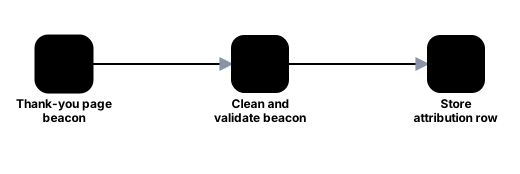
Receives the payment id and the ad data saved in the browser from the thank-you page, and stores it so the paid workflow can attach it to the Meta event. Only accepts requests from the clinic domain with a valid payment id.

  • n8n

3 nodes. Starts from a webhook.

View the workflow map
Map of the Thank-you page attribution workflow: 3 steps, left to right.
  1. Thank-you page beacon
  2. Clean and validate beacon
  3. Store attribution row

Payments

Second payment: paid or failed

Runs when the assessment workflow receives the larger payment: matches the payer by phone, moves the opportunity through Pre-Qualified to Deposit, sends the Meta events, alerts sales and handles failed payments.

  • n8n
  • Razorpay
  • GoHighLevel (Synamate)
  • Meta Conversions API
  • Slack

36 nodes. Starts from another workflow, and reports its own crashes.

View the workflow map
Map of the Second payment: paid or failed workflow: 36 steps, left to right.
  1. From Razorpay webhook (assessment workflow)
  2. If this workflow crashes
  3. Check payment
  4. Slack: workflow crashed
  5. Has phone or email?
  6. Already handled?
  7. Synamate: find contact by phone
  8. Pick contact (phone first)
  9. Phone owner found?
  10. Synamate: update phone owner
  11. Synamate: upsert contact
  12. Resolved contact
  13. Synamate: add tags
  14. Paid or failed?
  15. Synamate: find program opportunity
  16. Summarise failed run
  17. Decide opportunity action
  18. Which path?
  19. Synamate: create at Pre-Qualified
  20. Synamate: move to Pre-Qualified
  21. Wait 60s (let CompleteRegistration fire)
  22. Ready for Deposit
  23. Synamate: move to Deposit
  24. Prepare Meta event
  25. Meta: send AssessmentPaid
  26. Summarise paid run
  27. CTWA: lookup click
  28. Slack: notify sales
  29. Ledger: record payment
  30. Any problems?
  31. CTWA: has click id?
  32. Slack: alert tech channel
  33. Prepare Purchase (WhatsApp)
  34. Meta: send Purchase (WhatsApp)
  35. Check Purchase (WhatsApp) reply
  36. Purchase (WhatsApp) failed?

Ad tracking

Conversion engine: Meta CAPI + GA4

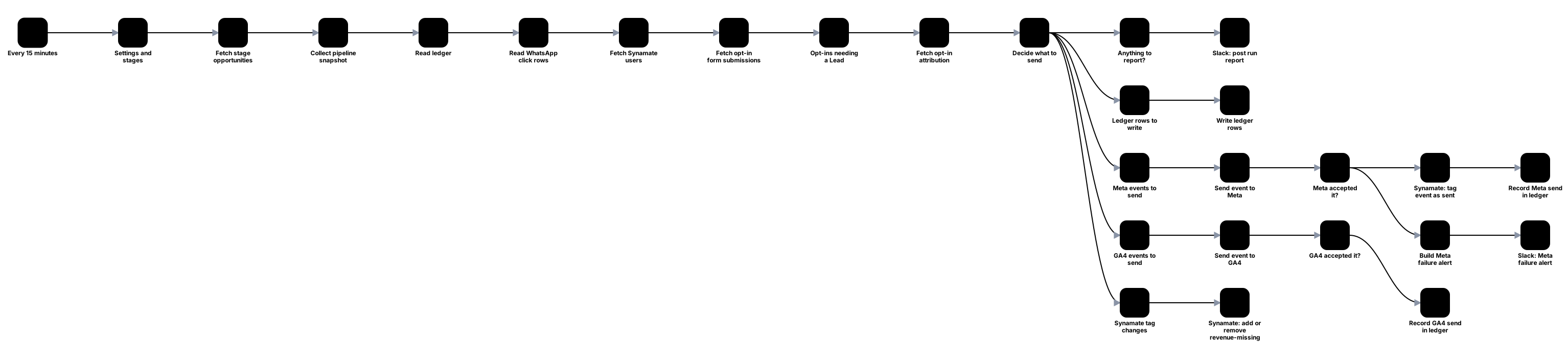
The single sender of funnel events to Meta and GA4: opt-in leads plus qualified, registration and purchase events from CRM pipeline stages, with warnings posted to Slack.

  • n8n
  • Meta Conversions API
  • GA4
  • GoHighLevel (Synamate)

28 nodes. Starts from a schedule.

View the workflow map
Map of the Conversion engine: Meta CAPI + GA4 workflow: 28 steps, left to right.
  1. Every 15 minutes
  2. Settings and stages
  3. Fetch stage opportunities
  4. Collect pipeline snapshot
  5. Read ledger
  6. Read WhatsApp click rows
  7. Fetch Synamate users
  8. Fetch opt-in form submissions
  9. Opt-ins needing a Lead
  10. Fetch opt-in attribution
  11. Decide what to send
  12. Anything to report?
  13. Ledger rows to write
  14. GA4 events to send
  15. Synamate tag changes
  16. Meta events to send
  17. Slack: post run report
  18. Write ledger rows
  19. Send event to GA4
  20. Synamate: add or remove revenue-missing
  21. Send event to Meta
  22. GA4 accepted it?
  23. Meta accepted it?
  24. Record GA4 send in ledger
  25. Synamate: tag event as sent
  26. Build Meta failure alert
  27. Record Meta send in ledger
  28. Slack: Meta failure alert

Ad tracking

Pre-Qualified lead to Meta QualifiedLead

When a lead reaches Pre-Qualified, sends Meta a custom QualifiedLead event once per contact, with hashed contact data and click ids, plus a WhatsApp LeadSubmitted for click-to-WhatsApp ads. Every send is recorded in a ledger and failures raise an alert.

  • n8n
  • Meta Conversions API
  • GoHighLevel (Synamate)
  • Slack

19 nodes. Starts from a webhook.

View the workflow map
Map of the Pre-Qualified lead to Meta QualifiedLead workflow: 19 steps, left to right.
  1. Synamate: lead moved to Pre-Qualified
  2. Read Synamate payload
  3. Has contact id?
  4. Already sent?

  5. Slack: alert (no contact id)
  6. First time for this lead?
  7. Synamate: get contact
  8. Prepare QualifiedLead
  9. Meta: send QualifiedLead
  10. Check Meta reply
  11. CTWA: lookup click
  12. Accepted by Meta?
  13. CTWA: has click id?
  14. Ledger: record QualifiedLead
  15. Slack: alert (Meta problem)
  16. Prepare LeadSubmitted (WhatsApp)
  17. Meta: send LeadSubmitted
  18. Check LeadSubmitted reply
  19. LeadSubmitted failed?

Ad tracking

Video sales page form to Meta OptinSubmitted

When the video-sales-page form is submitted, sends Meta a custom OptinSubmitted event once per contact, with hashed contact data and click ids, records it in a ledger and alerts on any problem.

  • n8n
  • Meta Conversions API
  • GoHighLevel (Synamate)
  • Slack

13 nodes. Starts from a webhook.

View the workflow map
Map of the Video sales page form to Meta OptinSubmitted workflow: 13 steps, left to right.
  1. Synamate: VSL deposit form submitted
  2. Read Synamate payload
  3. Has contact id?
  4. Already sent?
  5. Slack: alert (no contact id)
  6. First time for this lead?
  7. Synamate: get contact
  8. Prepare OptinSubmitted
  9. Meta: send OptinSubmitted
  10. Check Meta reply
  11. Accepted by Meta?
  12. Ledger: record OptinSubmitted
  13. Slack: alert (Meta problem)

Ad tracking

WhatsApp click attribution

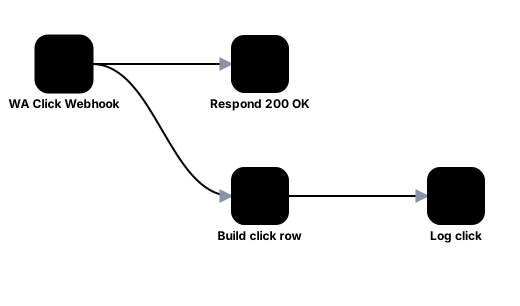
Captures UTMs and click ids from every landing page, keyed by a short token added to the WhatsApp message, so a lead who messages on WhatsApp can be traced back to the ad that brought them.

  • n8n
  • Google Tag Manager
  • WhatsApp
  • TailorTalk

4 nodes. Starts from a webhook.

View the workflow map
Map of the WhatsApp click attribution workflow: 4 steps, left to right.
  1. WA Click Webhook
  2. Respond 200 OK
  3. Build click row
  4. Log click

Ad tracking

Video page call-to-action clicks

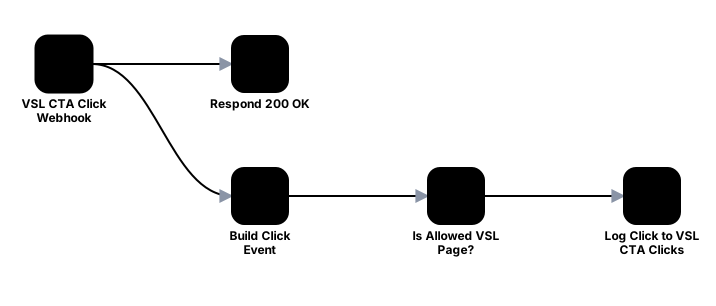
Logs every click on the WhatsApp call-to-action of the video sales pages with its ad and UTM data, and answers instantly so the redirect never waits.

  • n8n

5 nodes. Starts from a webhook.

View the workflow map
Map of the Video page call-to-action clicks workflow: 5 steps, left to right.
  1. VSL CTA Click Webhook
  2. Respond 200 OK
  3. Build Click Event
  4. Is Allowed VSL Page?
  5. Log Click to VSL CTA Clicks

AI chat

TailorTalk to Synamate: the single pipe

One endpoint for every TailorTalk webhook: normalises the lead, upserts the CRM contact with chat summary, heat level and UTMs, creates or updates the opportunity, escalates hot leads to Slack and audits every sync.

  • n8n
  • TailorTalk
  • GoHighLevel (Synamate)
  • Slack

29 nodes. Starts from a webhook.

View the workflow map
Map of the TailorTalk to Synamate: the single pipe workflow: 29 steps, left to right.
  1. TailorTalk Webhook
  2. CTWA: read ad data
  3. Normalise TailorTalk lead
  4. CTWA: already stored?
  5. Sync to Synamate?
  6. Escalation event?
  7. Synamate: find existing contact
  8. Attribution lookup
  9. Slack: notify sales channel
  10. CTWA: store click
  11. Build contact payload
  12. Search OK?
  13. CTWA: wait for contact (45s)
  14. Synamate: upsert contact
  15. CTWA: find contact
  16. Contact upserted?
  17. CTWA: contact found?
  18. Synamate: sync remark tags
  19. Click token matched?
  20. CTWA: tag contact
  21. Synamate: find opportunity
  22. Link click row to contact
  23. Decide opportunity action
  24. Opportunity exists?
  25. Synamate: update opportunity
  26. Worth an opportunity?
  27. Synamate: create opportunity
  28. Audit sync result
  29. Slack: alert tech channel

AI chat

WATI high priority to CRM opportunity

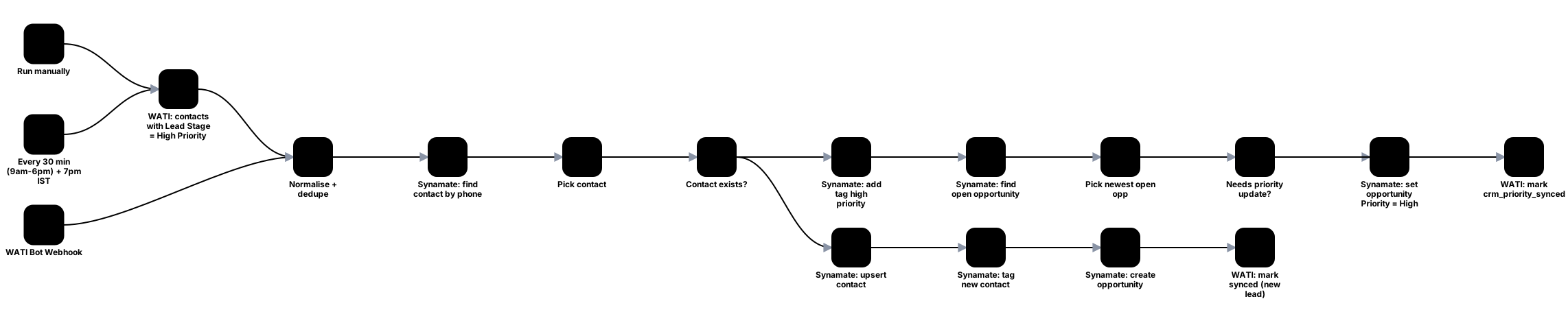
Every 30 minutes, and on a bot webhook, finds WATI contacts marked high priority, tags the CRM contact and sets the opportunity priority, creating the contact and opportunity if they are missing.

  • n8n
  • WATI
  • GoHighLevel (Synamate)

18 nodes. Starts from a webhook or a schedule or a manual run.

View the workflow map
Map of the WATI high priority to CRM opportunity workflow: 18 steps, left to right.
  1. Run manually
  2. Every 30 min (9am-6pm) + 7pm IST
  3. WATI: contacts with Lead Stage = High Priority
  4. WATI Bot Webhook
  5. Normalise + dedupe
  6. Synamate: find contact by phone
  7. Pick contact
  8. Contact exists?
  9. Synamate: add tag high priority
  10. Synamate: upsert contact
  11. Synamate: find open opportunity
  12. Synamate: tag new contact
  13. Pick newest open opp
  14. Synamate: create opportunity
  15. Needs priority update?
  16. WATI: mark synced (new lead)
  17. Synamate: set opportunity Priority = High
  18. WATI: mark crm_priority_synced

AI chat

Fresh opt-in: start the WhatsApp drip

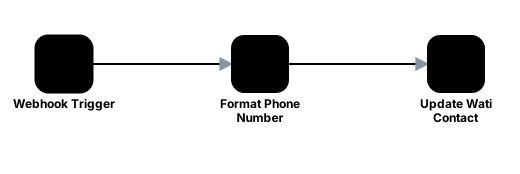
Cleans the phone number and updates the WATI contact with its lead status, which starts the WhatsApp drip sequence for a fresh opt-in.

  • n8n
  • WATI

3 nodes. Starts from a webhook.

View the workflow map
Map of the Fresh opt-in: start the WhatsApp drip workflow: 3 steps, left to right.
  1. Webhook Trigger
  2. Format Phone Number
  3. Update Wati Contact

AI chat

Opt-in welcome message

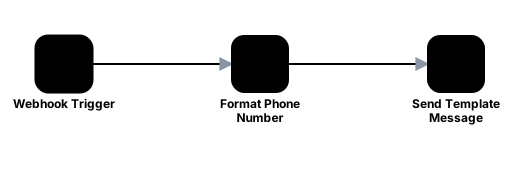
Sends the WhatsApp welcome template through WATI when a lead opts in.

  • n8n
  • WATI
  • GoHighLevel (Synamate)

3 nodes. Starts from a webhook.

View the workflow map
Map of the Opt-in welcome message workflow: 3 steps, left to right.
  1. Webhook Trigger
  2. Format Phone Number
  3. Send Template Message

AI chat Paused

Lead email nurture

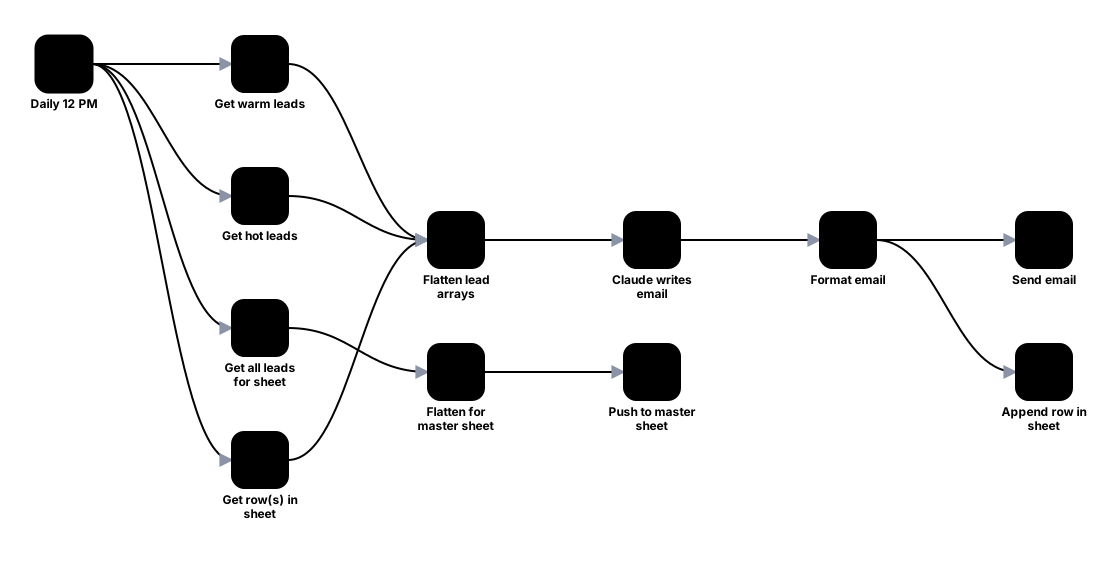
Pulls warm and hot leads from TailorTalk daily, has Claude draft a personal email, sends it from Gmail and logs every send to a sheet so no lead is emailed twice.

  • n8n
  • TailorTalk
  • Claude
  • Gmail
  • Google Sheets

12 nodes. Starts from a schedule.

View the workflow map
Map of the Lead email nurture workflow: 12 steps, left to right.
  1. Daily 12 PM
  2. Get warm leads
  3. Get hot leads
  4. Get all leads for sheet
  5. Get row(s) in sheet
  6. Flatten for master sheet
  7. Flatten lead arrays
  8. Push to master sheet
  9. Claude writes email
  10. Format email
  11. Send email
  12. Append row in sheet

CRM sync

Website form relay

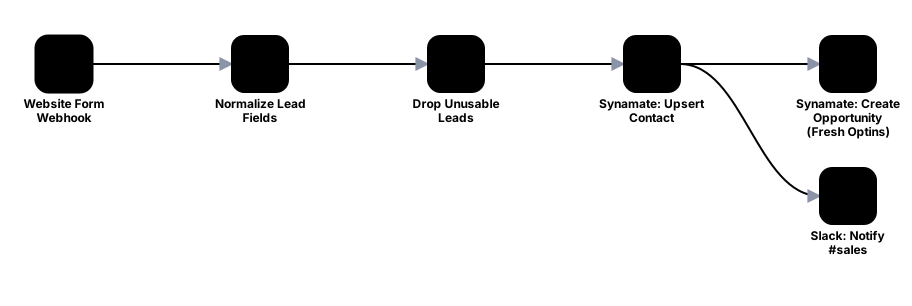
Relays website form submissions into the CRM: identifies fields by their type and value shape so form edits cannot break it, drops unusable leads, upserts the contact, opens an opportunity and notifies sales in Slack.

  • n8n
  • WordPress
  • Forminator
  • GoHighLevel (Synamate)
  • Slack

6 nodes. Starts from a webhook.

View the workflow map
Map of the Website form relay workflow: 6 steps, left to right.
  1. Website Form Webhook
  2. Normalize Lead Fields
  3. Drop Unusable Leads
  4. Synamate: Upsert Contact
  5. Synamate: Create Opportunity (Fresh Optins)
  6. Slack: Notify #sales

Forms and documents

Zoho Sign events

Receives Zoho Sign webhook events, checks a shared secret, reads the request details and posts viewed, signed, completed, recalled or declined events back to the app.

  • n8n
  • Zoho Sign
  • Supabase

7 nodes. Starts from a webhook.

View the workflow map
Map of the Zoho Sign events workflow: 7 steps, left to right.
  1. Zoho Sign Event
  2. Capture Raw Event
  3. Extract Zoho Id
  4. Check Secret And Id
  5. Get Request Details
  6. Build Event
  7. Post Event To Supabase

Forms and documents

Zoho Sign status sync

A fallback poller: every 15 minutes it finds recently changed Zoho Sign documents and posts their status events to the app.

  • n8n
  • Zoho Sign
  • Supabase

6 nodes. Starts from a schedule.

View the workflow map
Map of the Zoho Sign status sync workflow: 6 steps, left to right.
  1. Every 15 Minutes
  2. List Zoho Requests
  3. Pick Recently Changed
  4. Get Request Details
  5. Build Event
  6. Post Event To Supabase

AI chat

Lab report reader

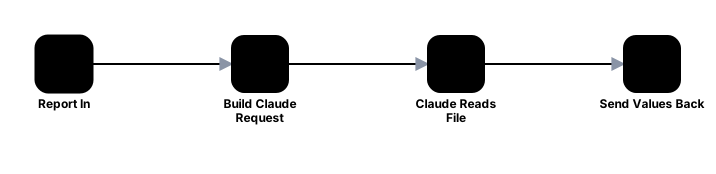
Receives a lab report or prescription from the clinic's report tool, asks Claude to extract the values as structured data and returns it.

  • n8n
  • Claude

4 nodes. Starts from a webhook.

View the workflow map
Map of the Lab report reader workflow: 4 steps, left to right.
  1. Report In
  2. Build Claude Request
  3. Claude Reads File
  4. Send Values Back

Reliability

Central error alerts

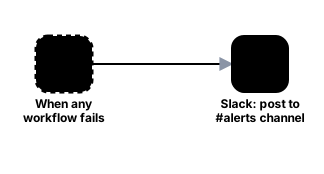
One error workflow for everything: any workflow that fails posts its name, the failed step, the error and a link to the execution in Slack.

  • n8n
  • Slack

2 nodes. Starts when any workflow fails.

View the workflow map
Map of the Central error alerts workflow: 2 steps, left to right.
  1. When any workflow fails
  2. Slack: post to #alerts channel

How we build them

  • Ledger tables mean a re-run never sends an event or creates a contact twice.
  • Meta and CRM replies are checked, and anything rejected raises a Slack alert.
  • Every workflow reports to one central error workflow, so a crash is never silent.
  • The contact that already owns a phone number wins, so WhatsApp, the bot and sales all see one record.

Want automations that don't fail silently?

Request a quote and show us what needs wiring up.